If you have already created a booking in your own PCC/OID, you can use the platform to issue it.
To import the manually created booking into Wings, first ensure that the PCC/OIDs you are working with are associated. This configuration or verification is done through the consolidator.

Once in the consolidator, click on "+" to add a new PCC/OID, and fill in the information for the Supplier (e.g., Amadeus, Sabre) and the corresponding PCC/OID. Then, click "update" to save the new configuration.

To begin the import process, go to Wings and select "Booking import."

Note: the reservation made manually in the supplier must have the fare quoted in the GDS.
In the first step of the process, you will need to enter the PNR of the reservation and select the corresponding PCC.

You will be able to view the details in the second step of the process. Verify that all the information is correct, and proceed to the next step by clicking on "Confirm data."
In the third step of the process, enter all the buyer's information. If this is the buyer's first transaction, all fields must be filled out manually. Otherwise, you can search for an existing buyer in the search bar, and the data will be loaded automatically.

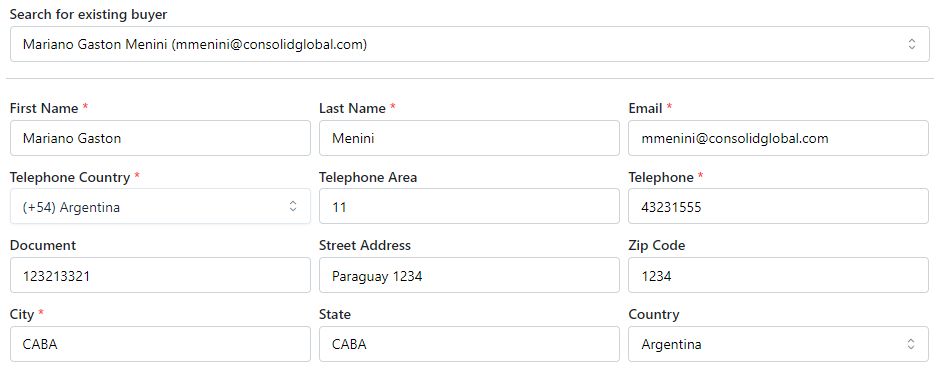
Once you have completed this step, proceed to the next one. Fill in all the payment-related information.

Finally, review all the import information. If everything is correct, finalize the import process.
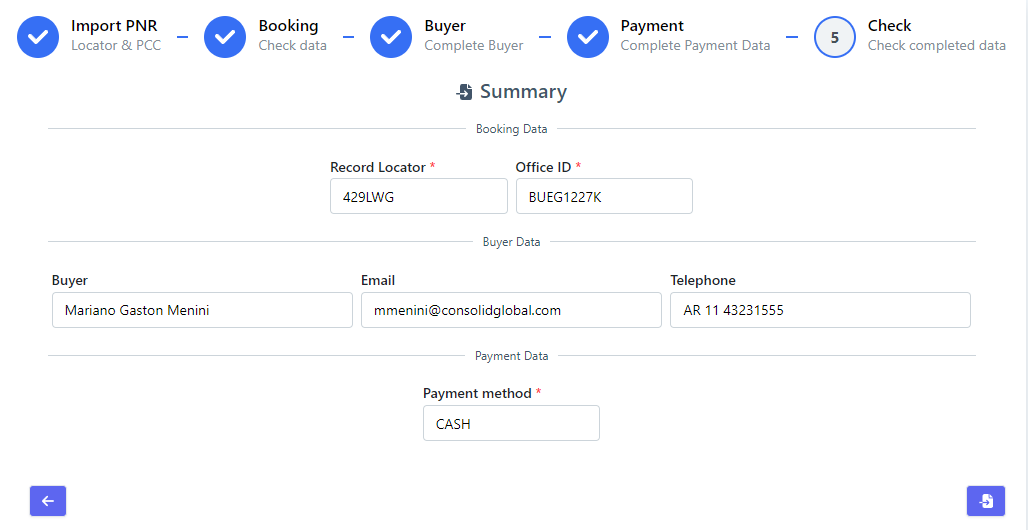
If imported correctly, you will find the reservation in the bookings list, ready to be issued.